

OpenAI-compatible endpoints are bring-your-own-key only. Your provider bills inference to your account, and Pullfrog never proxies this traffic.
Setup
1
Store the five values
In the Pullfrog console, click Set up on the Custom (OAI) tile of the Providers card and fill in the five required values from the table below. Pullfrog injects them into every run, so 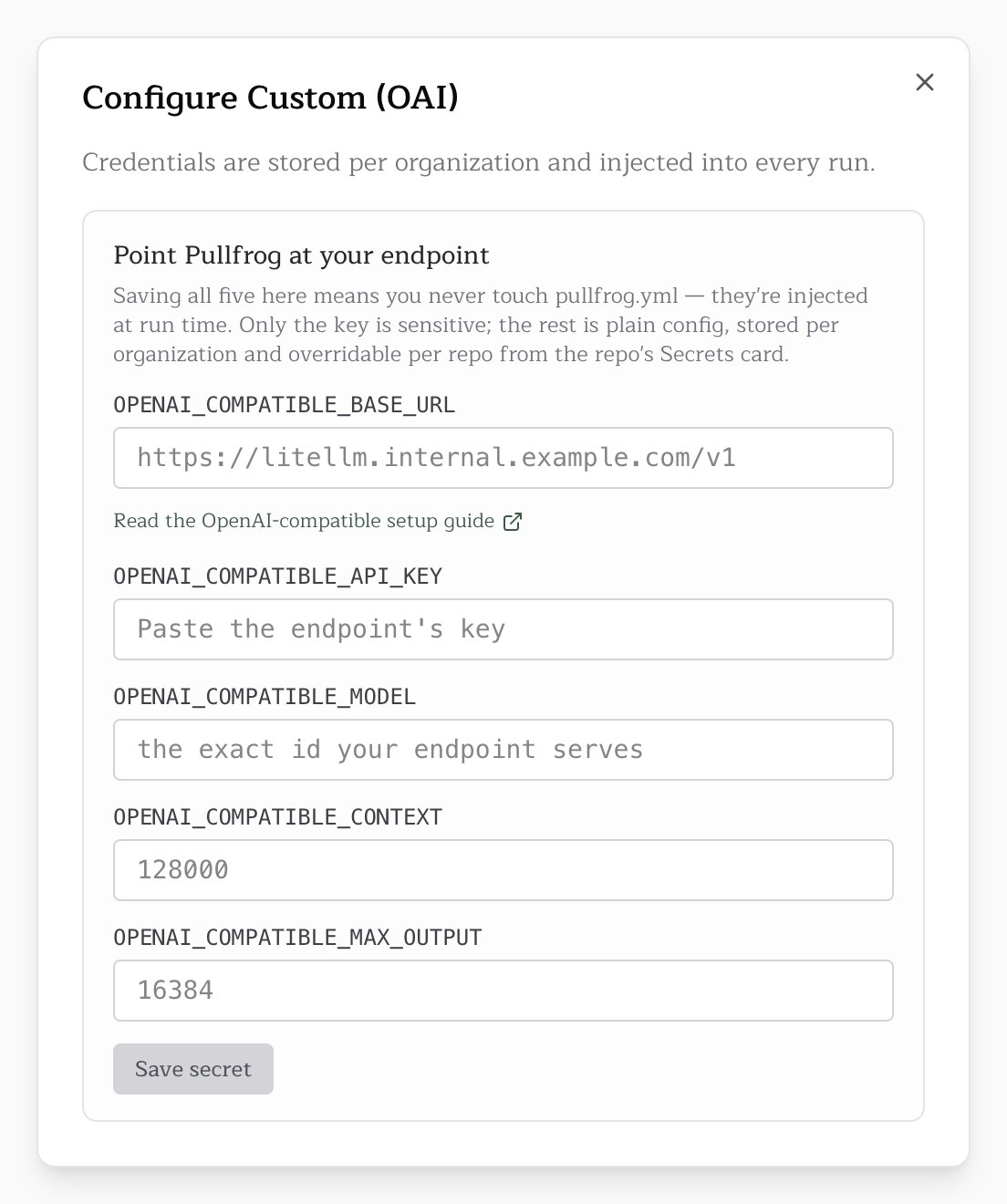
pullfrog.yml needs no changes. Values stored for the organization can be overridden per repository.OPENAI_COMPATIBLE_API_KEY in a GitHub Actions secret and the rest in the env: block of .github/workflows/pullfrog.yml:2
Pick the model
On the Model card, choose Manual and pick OpenAI-compatible under Custom in the model menu.
Variables
The first five are required, and a run without them fails before the agent starts. The two limits must be positive numbers, so
128k is rejected. A value set in the workflow wins over a stored one.
Put the key only in OPENAI_COMPATIBLE_API_KEY, never inside the base URL. A base URL set in the workflow is not masked in logs.
On an account that pays through Pullfrog Router, store the values in the Pullfrog console. Pullfrog decides how to fund a run before the runner starts, when GitHub Actions secrets are not visible to it, so a run whose values exist only there falls back to the Router’s default model.
Token limits
Your endpoint owns the model catalog, so Pullfrog cannot look up the model’s limits and needs you to declare them. Undeclared limits would break two things:- Completions are capped at 32000 tokens, and a model with a smaller cap rejects every request. GPT-4o and GPT-4o mini stop at 16384, and many open models at 4096 or 8192.
- Auto-compaction turns off. Compaction keys off the context limit, so a long session grows until the endpoint refuses it.
OPENAI_COMPATIBLE_CONTEXT to the model’s real window. A low value compacts earlier than needed; a high value delays compaction until the endpoint refuses the request.
Custom headers
An endpoint can require more than a bearer token, such as the service token of an access proxy in front of a self-hosted server. SetOPENAI_COMPATIBLE_HEADERS to one Name: Value per line, under Send custom headers in the dialog or in your workflow:
OPENAI_COMPATIBLE_<NAME>_HEADERS and never borrows the unnamed endpoint’s. Custom headers need Pullfrog 0.1.122 or later.
Text-only models
An agent sometimes reads an image, such as a screenshot of a page it rendered. A model that only accepts text rejects that request, and the run fails. SetOPENAI_COMPATIBLE_IMAGE_INPUT to "false" for such a model, with Add secret in the console or in your workflow:
OPENAI_COMPATIBLE_<NAME>_IMAGE_INPUT. The setting needs Pullfrog 0.1.138 or later.
Several endpoints
Give an endpoint a name to keep more than one. Each named endpoint holds its own five values and appears in the model menu under Custom, so every repository can pick one, and switching between them never means entering a key again.1
Name the endpoint
In the Configure Custom (OAI) dialog, type a name under Add a named endpoint and click Add. Names use lowercase letters, digits and single hyphens, such as
vllm-a, up to 32 characters.2
Store its five values
Fill in the endpoint’s base URL, key, model ID and token limits, and save.
3
Pick it
Choose it in a repository’s model menu, or name it for a single run with
@pullfrog --model=openai-compatible/vllm-a.OPENAI_COMPATIBLE_. To keep vllm-a in the workflow instead:
OPENAI_COMPATIBLE_* names and the OpenAI-compatible menu entry, so existing setups need no change. Named endpoints need Pullfrog 0.1.105 or later; an older runner reads openai-compatible/vllm-a as the model ID vllm-a on the unnamed endpoint.
Smart model selection
Under Smart, pick Custom (OAI) as the provider. With no guidance, every run takes the endpoint’s own model,OPENAI_COMPATIBLE_MODEL. To use other models the endpoint serves, mention them by ID in the guidance on the Model row, in your own words:
Through a provider’s tile
A gateway that serves a provider’s models under their own IDs, such as OpenAI’s or DeepSeek’s, can also run that provider’s models on Smart, from the provider’s own tile:1
Store the gateway on the provider's tile
Click Set up on the provider’s tile of the Providers card. Put the gateway’s key in the API key field, then expand Set up a proxy or gateway and enter the gateway’s base URL, such as the path that ends in
/v1.2
Pick the provider under Smart
On the Model card, choose Smart and pick that provider.
POST /v1/responses), not only /chat/completions. The gateway must also accept the provider’s own model IDs. The Model card lists the ID each model sends. Pullfrog moves a model to a newer version when one ships, so the gateway has to serve the new ID too.
Model IDs
The model menu’s OpenAI-compatible entry runs the unnamed endpoint;OPENAI_COMPATIBLE_MODEL names the actual model, in your gateway’s own format:
LiteLLM
A LiteLLM proxy needs no special configuration. Point the base URL at the proxy’s/v1 path and use a virtual key:
Routing
Pullfrog runs the model on OpenCode, through an@ai-sdk/openai-compatible provider pointed at OPENAI_COMPATIBLE_BASE_URL. Requests go to <base URL>/chat/completions with your key as the bearer token.